Application 클래스
윈도우 응용 프로그램 시작/종료 메소드 제공
Application.Run()
Application.Exit()
윈도우 메시지 처리하는 것
메시지 필터링
컨트롤
윈도우 운영체제가 제공하는 사용자 인터페이스 요소
메뉴, 콤보박스, 리스트뷰, 버튼, 텍스트박스 등과 같은 표준 컨트롤 제공
컨트롤은 다음과 같은 절차로 Form 위에 배치
1. 컨트롤의 인스턴스 생성
2. 컨트롤의 프로퍼티에 값 지정
3. 컨트롤의 이벤트에 이벤트 처리기 등록
4. 폼에 컨트롤 추가
윈도우 - 컨트롤
자바 - 컴포넌트
안드로이드 - 위젯
|
1
2
3
4
5
6
7
8
9
10
11
12
13
14
15
16
17
18
19
20
21
22
23
24
25
26
27
28
29
30
31
32
33
34
35
36
37
38
39
40
41
42
43
44
45
46
47
48
49
50
51
52
53
54
55
56
57
58
59
60
61
62
63
64
65
66
67
68
69
70
71
72
73
74
75
76
77
78
79
80
81
82
|
using System;
using System.Collections.Generic;
using System.ComponentModel;
using System.Data;
using System.Drawing;
using System.Linq;
using System.Text;
using System.Threading.Tasks;
using System.Windows.Forms;
namespace UsingControls
{
public partial class MainForm : Form
{
public MainForm()
{
InitializeComponent();
}
private void MainForm_Load(object sender, EventArgs e)
{
var Fonts = FontFamily.Families;
foreach (FontFamily font in Fonts)
cboFont.Items.Add(font.Name);
}
public void ChangeFont()
{
if (cboFont.SelectedIndex < 0) // 선택X 아무동작X
return;
FontStyle style = FontStyle.Regular;
if (checkBold.Checked)
style |= FontStyle.Bold;
if (checkItalic.Checked)
style |= FontStyle.Italic;
txtSampleText.Font = new Font((string)cboFont.SelectedItem, 10, style);
}
private void cboFont_SelectedIndexChanged(object sender, EventArgs e)
{
ChangeFont();
}
private void checkBold_CheckedChanged(object sender, EventArgs e)
{
ChangeFont();
}
private void checkItalic_CheckedChanged(object sender, EventArgs e)
{
ChangeFont();
}
private void btnModal_Click(object sender, EventArgs e)
{
Form frm = new Form();
frm.Text = "Modal Form";
frm.Width = 300;
frm.Height = 300;
frm.BackColor = Color.Red;
frm.ShowDialog(); // Modal 창을 띄웁니다.
}
private void btnModaless_Click(object sender, EventArgs e)
{
Form frm = new Form();
frm.Text = "Modaless Form";
frm.Width = 300;
frm.Height = 300;
frm.BackColor = Color.Green;
frm.Show(); // Modal 창을 띄웁니다.
}
private void btnMsgBox_Click(object sender, EventArgs e)
{
MessageBox.Show(txtSampleText.Text, "MessageBox Test", MessageBoxButtons.OK, MessageBoxIcon.Exclamation);
}
}
}
|
cs |
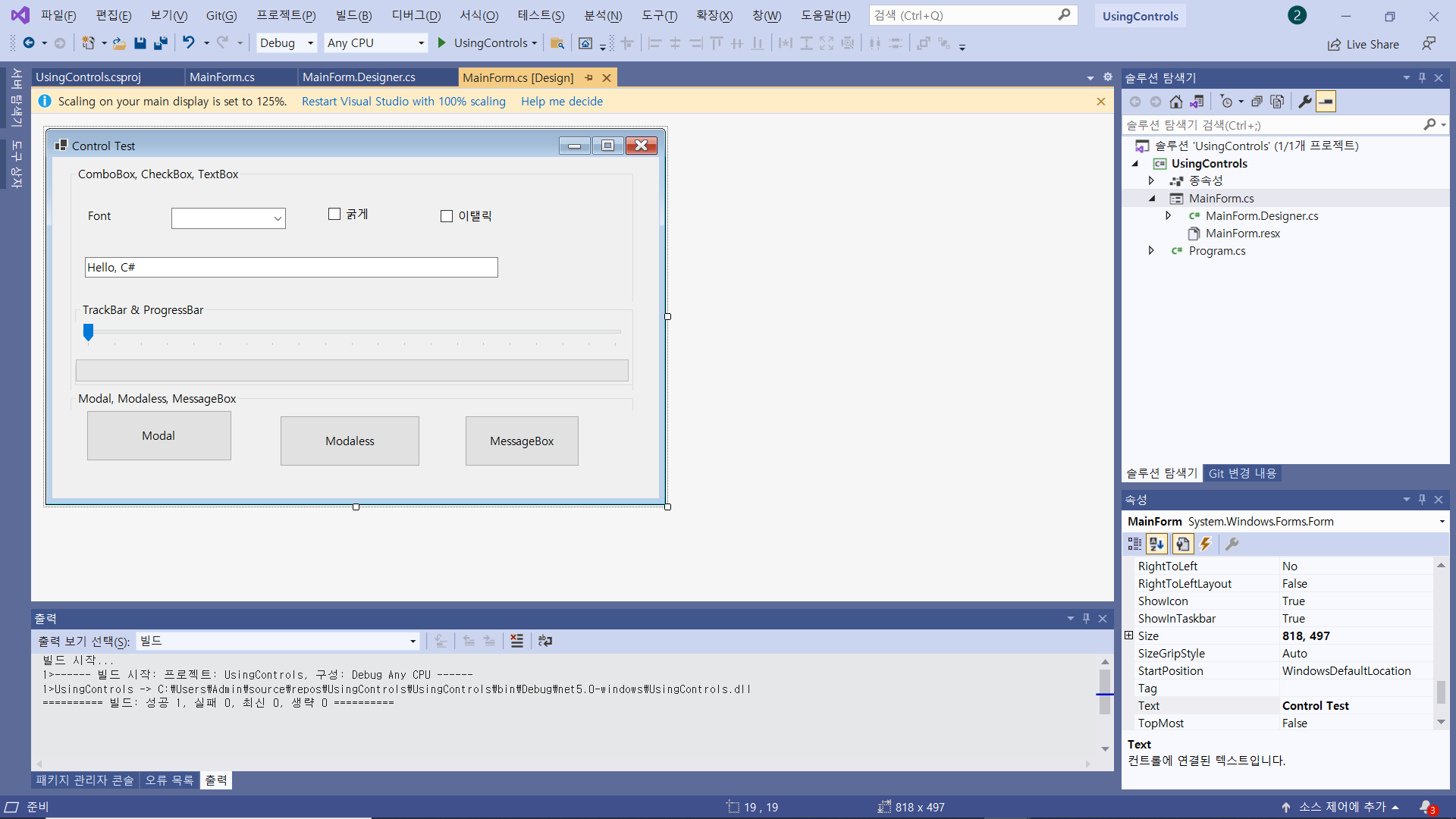
|
1
2
3
4
5
6
7
8
9
10
11
12
13
14
15
16
17
18
19
20
21
22
23
24
25
26
27
28
29
30
31
32
33
34
35
36
37
38
39
40
41
42
43
44
45
46
47
48
49
50
51
52
53
54
55
56
57
58
59
60
61
62
63
64
65
66
67
68
69
70
71
72
73
74
75
76
77
78
79
80
81
82
83
84
85
86
87
|
using System;
using System.Collections.Generic;
using System.ComponentModel;
using System.Data;
using System.Drawing;
using System.Linq;
using System.Text;
using System.Threading.Tasks;
using System.Windows.Forms;
namespace UsingControls
{
public partial class MainForm : Form
{
public MainForm()
{
InitializeComponent();
}
private void MainForm_Load(object sender, EventArgs e)
{
var Fonts = FontFamily.Families;
foreach (FontFamily font in Fonts)
cboFont.Items.Add(font.Name);
}
public void ChangeFont()
{
if (cboFont.SelectedIndex < 0) // 선택X 아무동작X
return;
FontStyle style = FontStyle.Regular;
if (checkBold.Checked)
style |= FontStyle.Bold;
if (checkItalic.Checked)
style |= FontStyle.Italic;
txtSampleText.Font = new Font((string)cboFont.SelectedItem, 10, style);
}
private void cboFont_SelectedIndexChanged(object sender, EventArgs e)
{
ChangeFont();
}
private void checkBold_CheckedChanged(object sender, EventArgs e)
{
ChangeFont();
}
private void checkItalic_CheckedChanged(object sender, EventArgs e)
{
ChangeFont();
}
private void btnModal_Click(object sender, EventArgs e)
{
Form frm = new Form();
frm.Text = "Modal Form";
frm.Width = 300;
frm.Height = 300;
frm.BackColor = Color.Red;
frm.ShowDialog(); // Modal 창을 띄웁니다.
}
private void btnModaless_Click(object sender, EventArgs e)
{
Form frm = new Form();
frm.Text = "Modaless Form";
frm.Width = 300;
frm.Height = 300;
frm.BackColor = Color.Green;
frm.Show(); // Modal 창을 띄웁니다.
}
private void btnMsgBox_Click(object sender, EventArgs e)
{
MessageBox.Show(txtSampleText.Text, "MessageBox Test", MessageBoxButtons.OK, MessageBoxIcon.Exclamation);
}
private void tbDummy_Scroll(object sender, EventArgs e)
{
pgDummy.Value = tbDummy.Value;
}
}
}
|
cs |
파일과 디렉토리
파일(File) : 컴퓨터 저장매체에 기록되는 데이터의 묶음
디렉토리 : 파일 또는 도 다른 디렉토리의 묶음
폴더 : 디렉토리의 동의어
System.IO 네임스페이스에 파일/디렉토리를 다루는 클래스 위치
File : 파일의 생성, 복사, 삭제, 이동, 조회를 처리하는 정적 메소드 제공
FileInfo : File 클래스와 동일한 기능을 하는 인스턴스 메소드 제공
Directory : 디렉토리의 생성, 삭제, 이동, 조희를 처리하는 정적 메소드 제공
DirectoryInfo : Directory 클래스와 동일한 기능을 하는 인스턴스 메소드 제공
System.IO.Stream 클래스
입력 스트림, 출력 스트림의 역할을 모두 수행
BinaryWriter BinaryReader
StreamWriter StreamReader
텍스트 파일 쓰기 StreamWriter
텍스트 파일 쓰기 지원
Streamd의 파생클래스와 함께 사용
|
1
2
3
4
5
6
7
8
9
10
11
12
13
14
15
16
17
18
19
20
21
22
23
24
|
using System;
using System.Collections.Generic;
using System.Linq;
using System.Text;
using System.Threading.Tasks;
using System.IO;
namespace TextFile
{
class Program
{
static void Main(string[] args)
{
// C#에서 텍스트 파일에 글을 적는 방법~!!!
using(StreamWriter sw = new StreamWriter(new FileStream("a.txt", FileMode.Create)))
{
sw.WriteLine(int.MaxValue);
sw.WriteLine("Good Morning");
sw.WriteLine(uint.MaxValue);
sw.WriteLine("안녕하세요~!");
}
}
}
}
|
cs |
|
1
2
3
4
5
6
7
8
9
10
11
12
13
14
15
16
17
18
19
20
21
22
23
24
25
26
27
28
29
30
31
|
using System;
using System.Collections.Generic;
using System.Linq;
using System.Text;
using System.Threading.Tasks;
using System.IO;
namespace TextFile
{
class Program
{
static void Main(string[] args)
{
// C#에서 텍스트 파일에 글을 적는 방법~!!!
//using(StreamWriter sw = new StreamWriter(new FileStream("a.txt", FileMode.Create)))
//{
// sw.WriteLine(int.MaxValue);
// sw.WriteLine("Good Morning");
// sw.WriteLine(uint.MaxValue);
// sw.WriteLine("안녕하세요~!");
//}
using (StreamReader sr = new StreamReader(new FileStream("a.txt", FileMode.Open)))
{
while (sr.EndOfStream == false)
{
Console.WriteLine(sr.ReadLine());
}
}
}
}
}
|
cs |
|
1
2
3
4
5
6
7
8
9
10
11
12
13
14
15
16
17
18
19
20
21
22
23
24
25
26
27
28
29
30
31
32
33
|
using System;
using System.Collections.Generic;
using System.Linq;
using System.Text;
using System.Threading.Tasks;
using System.IO;
namespace BinaryFile
{
class Program
{
static void Main(string[] args)
{
//쓰기
using(BinaryWriter bw = new BinaryWriter(new FileStream("a.dat", FileMode.Create)))
{
bw.Write(int.MaxValue);
bw.Write("Good Morning");
bw.Write("안녕하세요");
bw.Write(double.MaxValue);
}
using (BinaryReader br = new BinaryReader(new FileStream("a.dat", FileMode.Open)))
{
Console.WriteLine(br.ReadInt32());
Console.WriteLine(br.ReadString());
Console.WriteLine(br.ReadString());
Console.WriteLine(br.ReadDouble());
}
//읽기
}
}
}
|
cs |
Q) 1 ~ 100까지의 출력값과
A ~ Z까지의 알파벳을 abc.txt 파일에 write한 후
xyz.txt파일로 복사하고 xyz.txt 파일의 내용을
화면에 출력하세요.
단, StreamWriter와 StreamReader를 사용하세요.
|
1
2
3
4
5
6
7
8
9
10
11
12
13
14
15
16
17
18
19
20
21
22
23
24
25
26
27
28
29
30
31
32
33
34
35
36
37
38
|
using System;
using System.Collections.Generic;
using System.Linq;
using System.Text;
using System.Threading.Tasks;
using System.IO;
namespace Quiz_CopyTxt
{
class Program
{
static void Main(string[] args)
{
using(StreamWriter sw = new StreamWriter(new FileStream("abc.txt", FileMode.Create)))
{
int i = 0;
while (++i != 101)
{
sw.Write(i);
}
sw.WriteLine();
char c = 'A';
while(c != ('Z'+1))
{
sw.Write(c++);
}
}
File.Copy("abc.txt", "xyz.txt");
using(StreamReader sr = new StreamReader(new FileStream("xyz.txt", FileMode.Open)))
{
while (sr.EndOfStream == false)
{
Console.WriteLine(sr.ReadLine());
}
}
}
}
}
|
cs |
Q) File 클래스 배우기
1) a.dat
c:\Temp\Test1\a.dat
파일을 생성해 주세요.
2) a.dat --> b.dat
복사해 주세요.
3) a.dat 삭제해 주세요.
4) c:\Temp\Test2\b.dat
이동 시켜주세요.
5) c:\Temp\Test2\b.dat
파일이 존재하는지 알려주세요.
존재하면 : Yes
존해하지 않으면 : No 출력
6) b.dat 파일의 속성을 출력해주세요.
|
1
2
3
4
5
6
7
8
9
10
11
12
13
14
15
16
17
18
19
20
21
22
23
24
25
26
27
28
29
30
31
32
33
34
35
36
37
38
39
40
41
|
using System;
using System.Collections.Generic;
using System.Linq;
using System.Text;
using System.Threading.Tasks;
using System.IO;
namespace Quiz_FileClass
{
class Program
{
static void Main(string[] args)
{
string path1 = "c:\\Temp\\Test1\\a.dat";
string path2 = "c:\\Temp\\Test1\\b.dat";
string path3 = "c:\\Temp\\Test2\\b.dat";
// 생성
FileStream fs = File.Create(path1);
fs.Close();
// 복사
File.Copy(path1, path2);
// 삭제
File.Delete(path1);
// 이동
File.Move(path2, path3);
// 파일 존재 확인
if (File.Exists(path3))
Console.WriteLine("Yes");
else
Console.WriteLine("No");
// 속성
Console.WriteLine(File.GetAttributes(path3));
}
}
}
|
cs |
FileInfo
|
1
2
3
4
5
6
7
8
9
10
11
12
13
14
15
16
17
18
19
20
21
22
23
24
25
26
27
28
29
30
31
32
33
34
35
36
37
38
|
using System;
using System.Collections.Generic;
using System.Linq;
using System.Text;
using System.Threading.Tasks;
using System.IO;
namespace Quiz_FileInfo
{
class Program
{
static void Main(string[] args)
{
string path1 = "c:\\Temp\\Test1\\a.dat";
string path2 = "c:\\Temp\\Test1\\b.dat";
string path3 = "c:\\Temp\\Test2\\b.dat";
FileInfo fi = new FileInfo(path1);
FileStream fs = fi.Create();
fs.Close();
fi.CopyTo(path2);
fi.Delete();
fi = new FileInfo(path2);
fi.MoveTo(path3);
if (fi.Exists)
Console.WriteLine("Yes");
else
Console.WriteLine("No");
Console.WriteLine(fi.Attributes);
}
}
}
|
cs |
스트림(Stream) I/O
Stream : 영어로 시내, 강 또는 도로의 차선을 뜻함
I/O에 있어 스트림은 "데이터가 흐르는 통로"를 뜻함
파일에 대한 순차접근(Sequential Access)
Random Access
System.IO.FileStream
618페이지
|
1
2
3
4
5
6
7
8
9
10
11
12
13
14
15
16
17
18
19
20
21
22
23
24
25
26
27
28
29
30
31
32
33
34
35
36
37
38
39
40
41
42
43
|
using System;
using System.Collections.Generic;
using System.Linq;
using System.Text;
using System.Threading.Tasks;
using System.IO;
namespace BasicIO
{
class Program
{
static void Main(string[] args)
{
long someValue = 0x123456789ABCDEF0;
Console.WriteLine("{0, -1} : 0x{1:X16}", "Original Data", someValue); // 16자리수 표현
Stream outStream = new FileStream("a.dat", FileMode.Create);
byte[] wBytes = BitConverter.GetBytes(someValue);
Console.Write("{0, -13} : ", "Byte array");
foreach (byte b in wBytes)
Console.Write("{0:X2}", b);
Console.WriteLine();
outStream.Write(wBytes, 0, wBytes.Length);
outStream.Close();
Stream inStream = new FileStream("a.dat", FileMode.Open);
byte[] rbytes = new byte[8];
int i = 0;
while (inStream.Position < inStream.Length)
rbytes[i++] = (byte)inStream.ReadByte();
long readValue = BitConverter.ToInt64(rbytes, 0);
Console.WriteLine("{0, -13} : 0x{1:X16}", "Read Data", readValue);
inStream.Close();
}
}
}
|
cs |
620페이지
|
1
2
3
4
5
6
7
8
9
10
11
12
13
14
15
16
17
18
19
20
21
22
23
24
25
26
27
28
29
30
31
|
using System;
using System.Collections.Generic;
using System.Linq;
using System.Text;
using System.Threading.Tasks;
using System.IO;
namespace UsingDeclaration
{
class Program
{
static void Main(string[] args)
{
long someValue = 0x123456789ABCDEF0;
// 쓰기 영역
using (Stream outStream = new FileStream("a.dat", FileMode.Create))
{
byte[] wbytes = BitConverter.GetBytes(someValue);
// ~~
}
// 읽기 영역
using(Stream inStream = new FileStream("a.dat", FileMode.Open))
{
byte[] rbytes = new byte[8];
// ~~~
}
}
}
}
|
cs |
|
1
2
3
4
5
6
7
8
9
10
11
12
13
14
15
16
17
18
19
20
21
22
23
24
25
26
27
28
29
30
31
32
33
|
using System;
using System.Collections.Generic;
using System.Linq;
using System.Text;
using System.Threading.Tasks;
using System.IO;
using FS = System.IO.FileStream;
namespace UsingDeclaration
{
class Program
{
static void Main(string[] args)
{
long someValue = 0x123456789ABCDEF0;
// 쓰기 영역
using (Stream outStream = new FS("a.dat", FileMode.Create))
{
byte[] wbytes = BitConverter.GetBytes(someValue);
// ~~
}
// 읽기 영역
using(Stream inStream = new FS("a.dat", FileMode.Open))
{
byte[] rbytes = new byte[8];
// ~~~
}
}
}
}
|
cs |
|
1
2
3
4
5
6
7
8
9
10
11
12
13
14
15
16
17
18
|
BinaryReader br = new BinaryReader(File.Open("test.txt", FileMode.Open));
while (true)
{
try {
var1 = br.ReadInt32();
var2 = br.ReadSingle();
Console.WriteLine("{0} {1}", var1, var2);
}
catch(EndOfStreamException e) //파일 끝에 도달한 예외처리
{
br.Close();
break;
}
}
|
cs |
프로세스와 스레드
프로세스
실행파일의 데이터와 코드가 메모리에 적재되어 동작하는 것
스레드
스레드는 운영체제가 CPU 시간을 할당하는 기본 단위
멀티 스레드
한 프로세스 안에 2개 이상의 스레드를 실행하는 기법
System.Threading.Thread : 스레드를 나타내는 클래스
스레드 기동 절차
Thread 인스턴스 생성(스레드가 실행할 메소드를 생성자 인수로 입력)
Thread.Start() 메소드 호출(스레드 시작)
Thread.Join() 메소드 호출(스레드 종료 대기)
|
1
2
3
4
5
6
7
8
9
10
11
12
13
14
15
16
17
18
19
20
21
22
23
24
25
26
27
28
29
30
31
32
33
34
35
36
37
|
using System;
using System.Collections.Generic;
using System.Linq;
using System.Text;
using System.Threading;
using System.Threading.Tasks;
namespace Thread_Test001
{
class Program
{
static void DoSomething()
{
for (int i = 0; i < 100; i++)
{
Console.WriteLine("DoSomething : {0}", i + 1);
}
}
static void DoSomething2()
{
for (int i = 101; i < 200; i++)
{
Console.WriteLine("DoSomething2 : {0}", i + 1);
}
}
static void Main(string[] args)
{
Thread t1 = new Thread(new ThreadStart(DoSomething));
Thread t2 = new Thread(new ThreadStart(DoSomething2));
t1.Start();
t2.Start();
t1.Join();
t2.Join();
Console.WriteLine("메인 프로그램을 종료합니다.");
}
}
}
|
cs |
|
1
2
3
4
5
6
7
8
9
10
11
12
13
14
15
16
17
18
19
20
21
22
23
24
25
26
27
28
29
30
31
32
33
34
35
36
37
38
39
40
|
using System;
using System.Collections.Generic;
using System.Linq;
using System.Text;
using System.Threading;
using System.Threading.Tasks;
namespace Quiz_Thread1
{
class Program
{
static void PrintBigAlpha()
{
char c = 'A';
while (c!=('Z'+1))
{
Console.WriteLine(c++);
}
}
static void ReverseNumber()
{
int i = 5000;
while (i!=0)
{
Console.WriteLine(i--);
}
}
static void Main(string[] args)
{
Thread Thread1 = new Thread(new ThreadStart(PrintBigAlpha));
Thread Thread2 = new Thread(new ThreadStart(ReverseNumber));
Thread1.Start();
Thread2.Start();
Thread1.Join();
Thread2.Join();
Console.WriteLine("메인 프로그램이 종료되었습니다.");
}
}
}
|
cs |
스레드 멈추기
Abort - 사용 비추천
Interrupt - 사용 추천
중요
스레드의 상태 변화
Unstarted : 스레드 생성 직후
Running : 실행중
WaitSleepJoin : 블록된 상태
Suspend : 일시 중단 상태
Aborted : 취소 상태
Stopped : 정지 상태
스레드 간의 동기화
멀티스레드 동기화
자원을 한 번에 한 스레드가 사용하도록 순서를 맞추는 것
동기화가 없다면?
단일 연산이라고 믿었던 C# 코드도 IL로 변환해보면 복잡한 단계를 거침
스레드 A가 i++을 실행하는 중에 스레드 B가 끼어들어 i++을 먼저 실행한다면
.NET이 제공하는 대표적 동기화 도구
lock 키워드
Monitor 클래스
크리티컬 섹션(Critical Section)
동시 접근이 불가능하도록 보호된 코드 영역
C#에서는 lock 키워드를 이용하여 생성 가능
Monitor 클래스
스레드 동기화를 지원하는 메소드 제공
Monitor.Enter()와 Monitor.Exit()를 이용하면 lock과 같이 크리티컬 섹션 생성 가능
Monitor.Wait()와 Monitor.Pulse()
'C#' 카테고리의 다른 글
| 스마트팩토리 5주 25일차 C# 19일차 (0) | 2021.06.01 |
|---|---|
| 스마트팩토리 5주 22일차 C# 16일차 ~ 25일차 C# 19일차 미니프로젝트 초밥 공정 시스템 (0) | 2021.06.01 |
| 스마트팩토리 5주 20일차 C# 14일차 (0) | 2021.05.24 |
| 스마트팩토리 4주 19일차 C# 13일차 (0) | 2021.05.21 |
| 스마트팩토리 4주 18일차 C# 12일차 (0) | 2021.05.20 |






최근댓글